

Efficient & Transparent Document Management
Transform the Way Your Organization Manages Documents
Modern document management goes beyond simple storage—it leverages smart information management to automate, secure, and optimize your organization’s information lifecycle. By combining AI-driven classification, intelligent search, and automated workflows, a robust Document Management System (DMS) ensures that critical documents are always secure, organized, and accessible to the right people at the right time. This approach boosts productivity, enhances collaboration, and maintains regulatory compliance effortlessly.
Reclaim Your Time with Instant Access
Eliminate wasted hours searching for documents. Locate critical information in seconds with advanced, integrated search technology.
Maintain Control with Real-Time Updates
Never lose track of document changes again. Gain full visibility with automated version control and seamless check-in / check-out functionality.
Unmatched Flexibility, Anytime, Anywhere
Stay connected and in control no matter where you are. Access, manage, and share documents securely from your smartphone or tablet with our powerful mobile app.
Achieve Effortless Organization Through Automation
Say goodbye to manual filing. Let automated document filing streamline your archiving processes, ensuring efficiency and accuracy.
Drive Collaboration and Accelerate Decisions
Break down silos and empower your teams with a unified platform that boosts collaboration and speeds up decision-making across your organization.
Maximize Resources and Cut Costs
Free up physical space and reduce storage expenses by transitioning to a fully digital document management system.
Easily Manage and Locate Information from the Dashboard
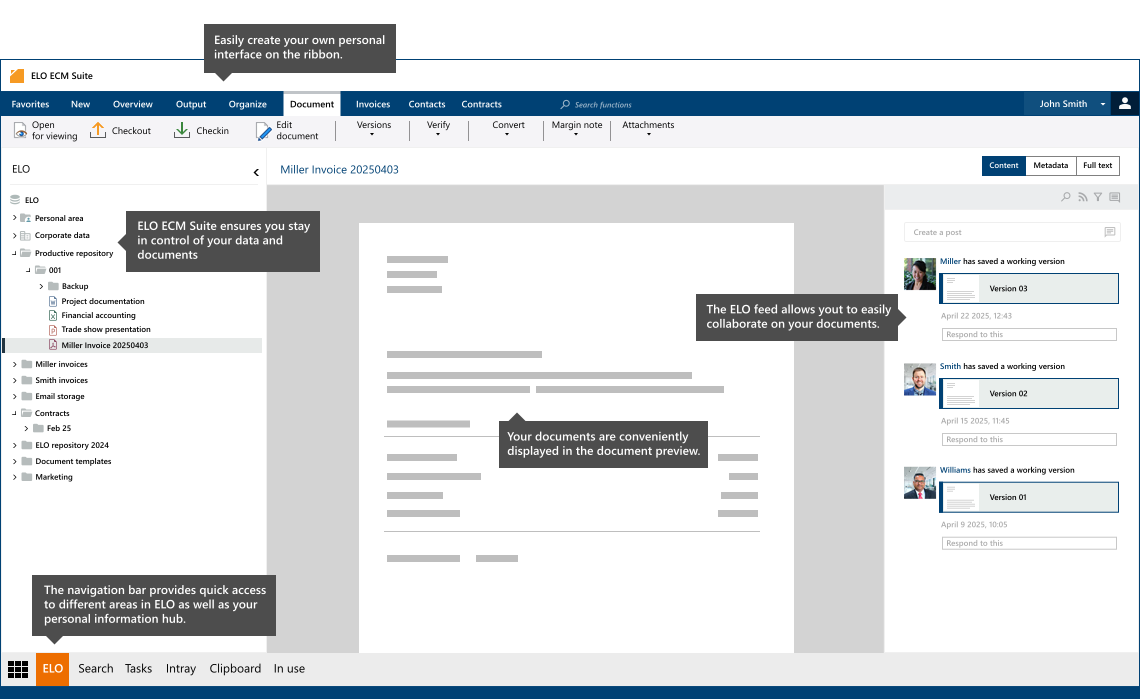
Contact us to learn more!
Answers to Your Most Important Document Management Questions
What is Document Management?
Document management is the digital management and organization of documents and information within a secure, centralized system. Whether a document is created electronically or digitized from paper later on, a Document Management System (DMS) ensures that all content is properly stored, indexed, and easily retrievable—eliminating the hassle of manual filing.
What Are the Core Functions of a Document Management System (DMS)?
A DMS goes far beyond basic storage. It provides:
- Automated Capture & Secure Storage – Seamlessly imports documents and stores them in a protected digital repository.
- Organization & Permission Management – Enforces role-based access, ensuring only authorized users can view or edit sensitive documents.
- Version Control – Maintains a detailed history of document changes, preventing data loss and ensuring compliance.
- Fast, Intelligent Search – Allows users to quickly locate documents using keywords, metadata, or full-text search.
- Streamlined Collaboration – Enables real-time collaboration, reducing approval times and simplifying workflows.
What Defines a Professional DMS?
A professional-grade DMS offers more than just document storage—it provides:
- Centralized & Encrypted Repository – Ensuring data security and compliance.
- Mobile & Remote Access – Securely access documents from anywhere through a mobile app or web interface.
- Version Control & Audit Trail – Automatically create new versions when documents are edited, maintaining the integrity of original files.
- Process Automation – Automates routine tasks like document approvals, enhancing efficiency—especially when integrated with ERP, CRM, or other business systems.
What Are the Top Benefits of Using a DMS?
Implementing a robust DMS delivers tangible benefits that enhance business performance:
- Save Time & Cut Costs – Spend less time searching for documents and reduce paper-related expenses.
- Enhanced Information Access – Find what you need quickly with powerful search capabilities.
- Improved Internal Collaboration – Enable teams to work together seamlessly by sharing, commenting, and approving documents in real time.
- Go Green by Reducing Paper Usage – Transitioning to a digital document environment promotes sustainability while freeing up valuable office space.
Which Documents Should Be Archived in a DMS?
A well-maintained DMS ensures regulatory compliance and easy access to critical business documents, including:
- Invoices, Contracts, and Agreements – Work, rental, and loan contracts.
- Emails and Correspondence – Important communications that need to be retained.
- Policies and Legal Documentation – Ensuring long-term compliance with industry regulations.
By archiving digitally, companies save space, ensure compliance, and maintain quick access to critical information.
How Are Documents Archived in a DMS?
When a document is added to the system, the DMS automatically:
- Captures Metadata – Essential information (such as date, author, and document type) is extracted and indexed.
- Indexes for Searchability – Documents are categorized and assigned search terms, making retrieval effortless.
- Preserves Original Document Status – Ensures that the original version remains intact for compliance and audit purposes.
Compliance Tip:
- E-Invoices must be archived electronically in their original format.
- Paper Invoices can be digitized and stored digitally following government regulations.